App Icon Generator
App Icon Tool
App Icon Generator
Generate platform-specific app icons instantly









iOS and macOS
Click or Drag and drop image
For best results, use a 1024 x 1024 pixel image
For best results use square icons without rounded corners.
Android
Live Preview
Circle
Squircle
Rounded Square
Square
Full Bleed
Monochrome
Legacy
Round
Play Store
Preview is approximate. Safe zone = 61% of canvas.
File name
Preview
Show safe zone
Show grid
General
Layer name
To change the prefix, update the File name above.
Source Asset
Asset Type
Path
Scaling
Trim
Leave the original asset unmodified
Resize
General
Layer name
To change the prefix, update the File name above.
Source Asset
Asset Type
Color
General
Layer name
To change the prefix, update the File name above.
Source Asset
Asset Type
Path
Scaling
Trim
Leave the original asset unmodified
Resize
Legacy Icon (API ≤ 25)
Generate
Shape
Round Icon (API = 25)
Generate
Google Play Store Icon
Generate
Icon Format
Format
Preview
See how your icon looks
Preview your icon across iOS and Android contexts before downloading.
iOS
How your icon appears in the iPhone home screen grid at 60 × 60 pt.
9:41
▲
App 1
Your App
App 3
App 4
App 5
App 6
App 7
App 8
App 9
App 10
App 11
App 12
App 13
App 14
App 15
App 16
App 17
App 18
App 19
App 20
Android
Your adaptive icon as it appears on the Android launcher at 48 dp.
9:41
▲
WiFi
🔍
Search…
App
App
Your App
App
App
App
App
App
App
App
App
App
App
App
App
App
App
App
App
App
App
App
App
App
App
These previews are for reference only. Actual appearance may vary across devices, OS versions, and system settings.
What Sets It Apart
More than a resizer
Most icon generators just resize your image. This tool lets you design, preview, and export — all from the browser.
React Icons clip art library
Access thousands of icons from Font Awesome, Material Design, Remix Icons, and more. Search and pick any icon as your foreground layer — no external source or design app required.
Text with typography styles
Type any character or word and apply Regular, Bold, or Italic styling. The builder renders it directly onto the icon canvas at full resolution.
Live device mockup preview
See your icon in iPhone and Android device frames across 8 real-world contexts — home screen, spotlight, settings, notification bar, App Store, and Google Play — before you export.
Cleaner than Android Studio
Skip the heavyweight IDE setup. Get the same adaptive icon output — foreground, background, legacy, round, and monochrome — with a drag-and-drop interface that takes seconds to learn.
Native Alternative
Generate Icons in Android Studio
Did you know Android Studio ships with a built-in Image Asset Studio? Generate adaptive, legacy, and round launcher icons in every required density — all without leaving your IDE.
Android Studio's Image Asset Studio handles the full adaptive icon pipeline natively: foreground layer, background layer, monochrome variant, legacy fallbacks, round icons, and Play Store artwork — all exported into the correct res/ directories in a single click. It mirrors everything this online generator does, making it a solid choice when you're already inside the IDE.
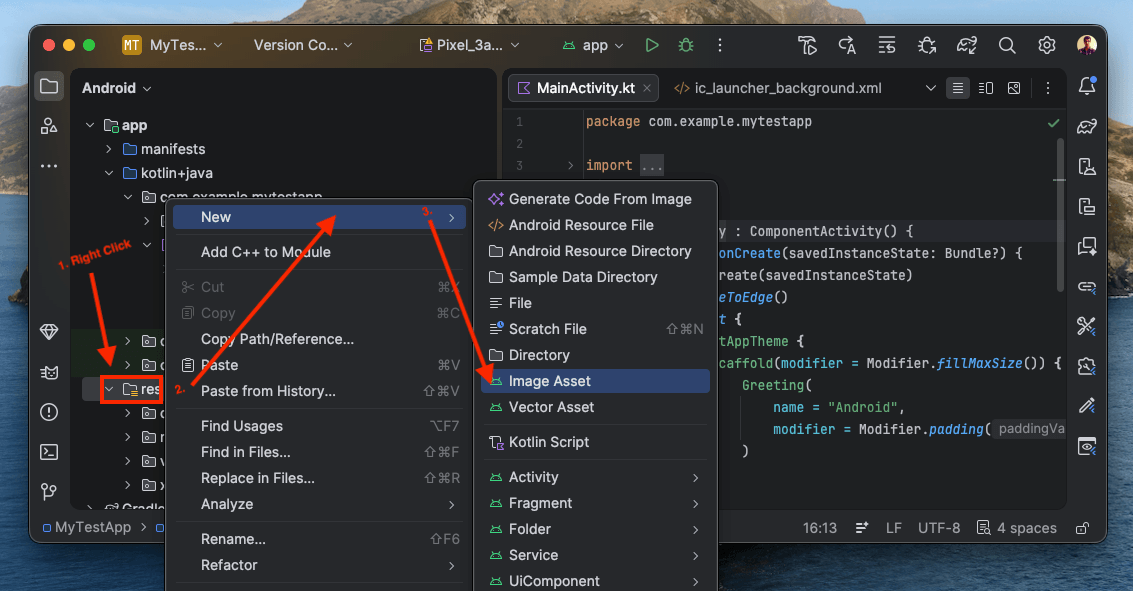
In the Project panel, expand your module and right-click the folder. From the context menu choose New → Image Asset. Android Studio will open the Configure Image Asset dialog (also called Asset Studio).
Tip: If you don't see the folder, make sure the Project view is set to Android (not Project) in the top-left dropdown of the panel.
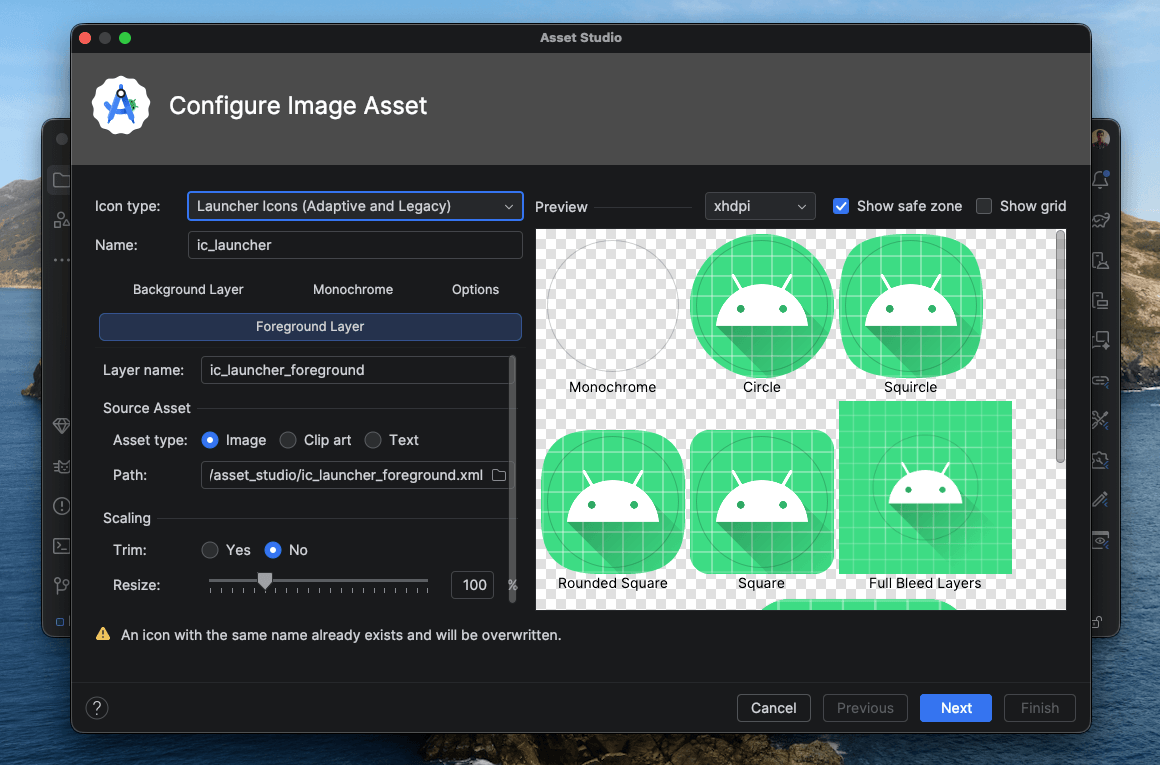
The Configure Image Asset dialog opens with four tabs: Foreground Layer, Background Layer, Monochrome, and Options. Set the icon type to Launcher Icons (Adaptive and Legacy), then:
- Foreground Layer — choose Image, Clip Art, or Text as your asset type, set trim and resize.
- Background Layer — pick a solid colour or image for the background.
- Monochrome — optional tinted icon for Android 13+ themed icons.
- Options — toggle legacy, round, and Google Play Store icon generation.
The live preview on the right shows your icon rendered as Circle, Squircle, Rounded Square, Square, and Full Bleed shapes in real time. Click Next, confirm the output paths, then Finish.
Highlights
Why use this generator
A full custom icon builder with live previews — not just a resizer.
Custom icon builder
Design icons from scratch using layered foreground and background — choose image, clip art, or styled text for each layer.
React Icons clip art library
Pick from thousands of icons across Font Awesome, Material Design, and more — no separate icon source needed.
Text with typography styles
Create text-based icons with Regular, Bold, or Italic styling directly in the builder.
Live device preview
See your icon rendered in iPhone and Android device frames across 8 real-world contexts before downloading.
Native folder output
Download Xcode AppIcon.appiconset and Android resource folders in a ZIP file you can drop into your project.
Instant, private generation
All processing happens in the browser — your image never leaves your device, and the ZIP is ready in seconds.
MVP-ready in minutes
Minimal and simple by design — gives your app a polished, functional icon that looks far better than any default placeholder, without needing a designer.
How It Works
Four quick steps
Upload or design, preview in context, then download a project-ready archive.
Upload or design
Drop in a source image, or switch to custom mode to build your icon from layers — image, React Icons clip art, or styled text.
Select target platforms
Toggle the Apple and Android outputs you need. Choose individual device targets — iPhone, iPad, watchOS, macOS, and Android.
Preview in context
Review your icon rendered in iPhone and Android device frames across home screen, spotlight, settings, notifications, and more.
Download the ZIP
Get a ZIP archive with platform-specific folders and metadata files ready for direct import into Xcode and Android Studio.
Comparison
Compared with other generators
A focused browser-first workflow with clearer platform control than many older tools.
| Feature | This tool | appicon.co | AppIconly |
|---|---|---|---|
Platform grouping | Separate Apple device toggles plus Android naming control | Simpler but less granular flow | Broad platform support with a more generalized setup |
Icon builder | Full layer builder — image, React Icons clip art library, or styled text as foreground/background | Image upload only | Image upload only |
Text styles | Regular, Bold, and Italic text directly on the icon canvas | Not supported | Not supported |
Live device preview | iPhone and Android device frames across 8 contexts (home screen, spotlight, settings, and more) | Basic preview | Shape-based previews, no device frames |
Output clarity | Explicit ZIP folder structure for Xcode and Android Studio | Good output but fewer inline explanations | Strong previews, but less emphasis on native project folder expectations |
Best fit | Developers who want to design, preview, and export icons without leaving the browser | Quick exports with a simpler utility feel | Users who want previews and styling controls before export |
Learn More
Related Article
Read a related article while the dedicated app icon guide is being prepared.

Thu Apr 02 2026 ‒ 3 mins read
App Icon Generator
Generate app icon sets for iPhone, iPad, watchOS, macOS, and Android from one image, then download a ready-to-use ZIP with platform-specific folders and store icons.

Muhammad Zeeshan
Common questions
Everything you need to know before generating icon packs.
A square 1024 × 1024 image works best. PNG is ideal, but JPG and WEBP are also accepted.
The Apple output includes an AppIcon.appiconset folder and a Contents.json file so the archive can be imported directly into Xcode.
The Android file name is applied to all generated Android icon assets and adaptive icon XML files.
Yes. The ZIP is structured for direct use in Xcode and Android Studio resource folders, though you should still review the generated assets before shipping.